
Console DayZ servers can't run mods, so most server tools never reach them. Law's KillFeed doesn't need any: it connects to your Nitrado account and reads the logs your Xbox or PlayStation server already writes.
Every two minutes the bot downloads the newest admin log and turns it into Discord posts: PvP and PvE kills, joins and leaves, building, player positions and more. Through the same Nitrado connection it can also restart your server, change server settings and deliver trader orders.
PC servers on Nitrado get the same feeds. A few tools edit files that only exist on console servers, so they are console only. They are marked below.
Setting up one platform? See the DayZ Xbox killfeed and the DayZ PS5 and PS4 killfeed pages.
FreeFree plan
- Every feed and log on Xbox and PlayStation
- Economy, bounties, factions, trader and zones
- Unlimited servers per Discord
Paid plan: No daily limits, auto-start when the server is down, XML events and automatic log downloads. From $4.99 a month for 1 server, $6.99 for up to 3.
What you get
No mods, no FTP
Log in with Discord, connect Nitrado with one click and pick your server. The dashboard sees whether it is an Xbox, PlayStation or PC server on its own.
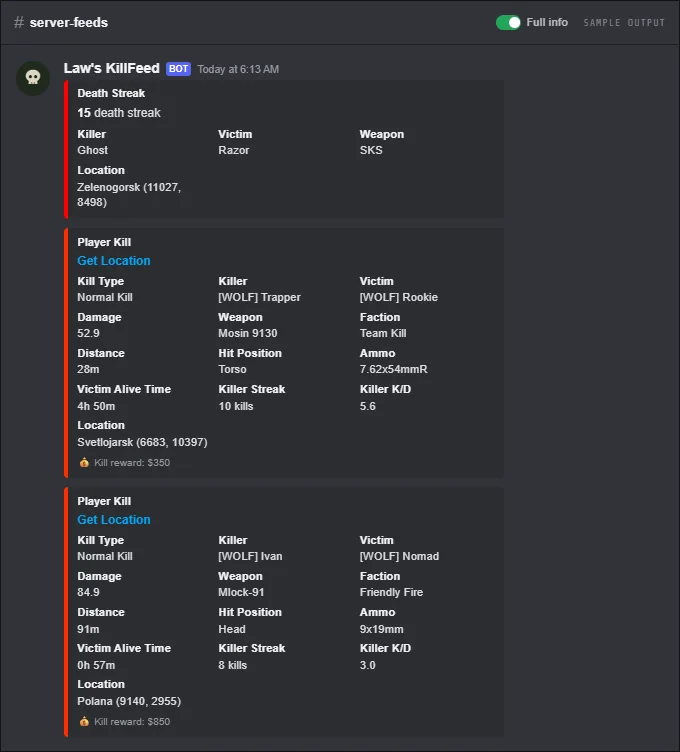
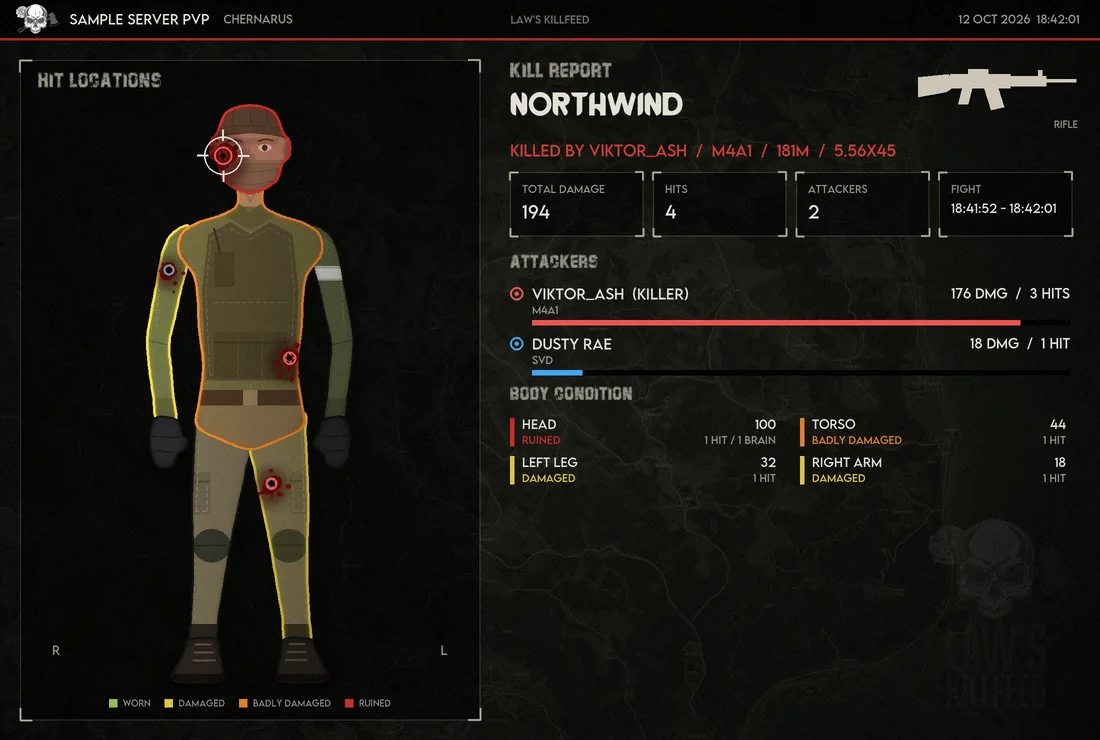
Full kill feed
Weapon, distance, body part, damage, streaks and K/D on every kill, the same as on PC.
Trader shop
Players buy items, packs and vehicles with server money on the web shop, and orders spawn at their drop point after the next restart.
Server settings (console only)
Switch raid mode, base and container damage, stamina, hitmarkers and night light from Discord, and add NPC spawns with XML events on the paid plan.
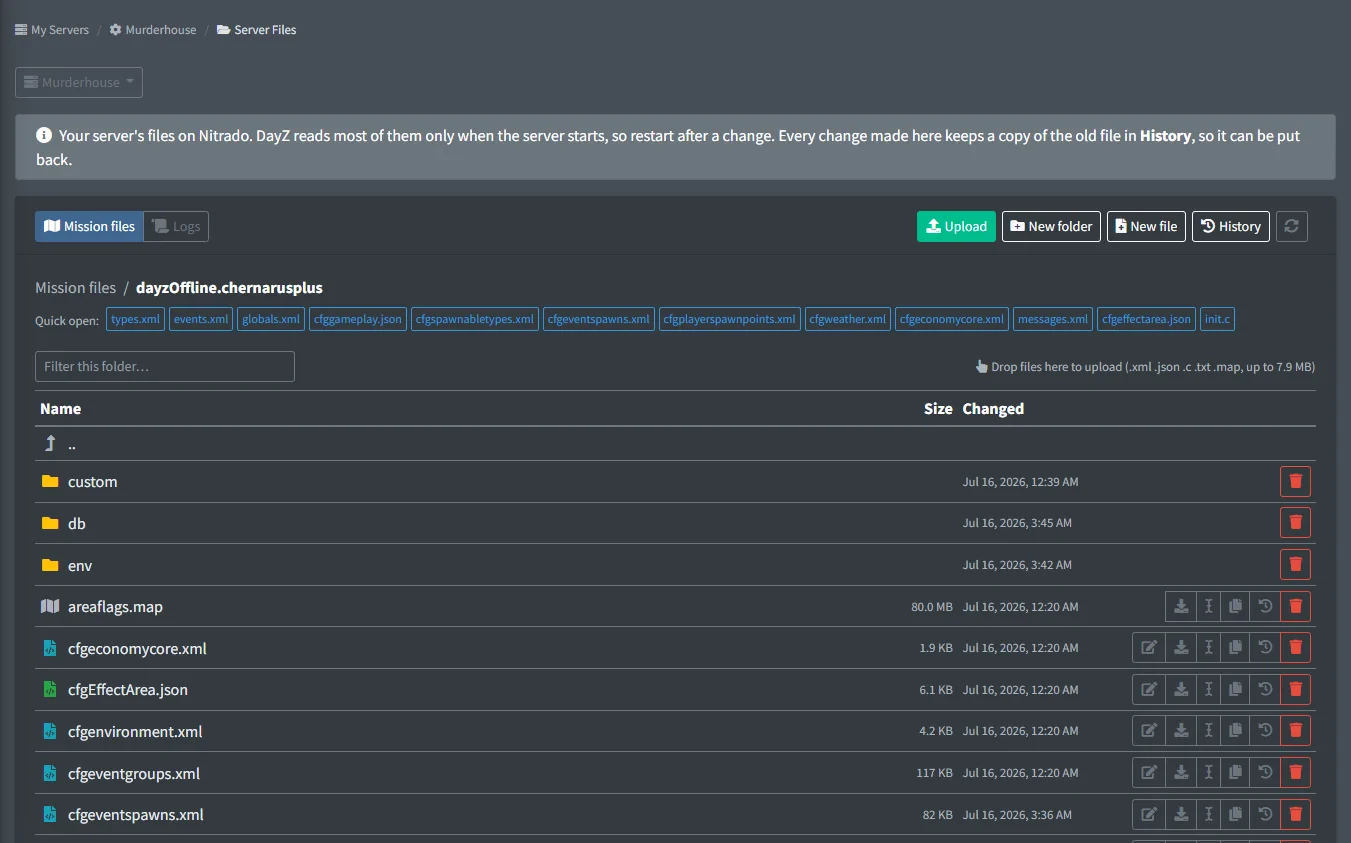
Server Files (console only)
Browse, check and upload your mission files from the dashboard, with no FTP. See Server Files.
Alt accounts
/alts lists the game accounts tied to one player through Discord (same linked account, verification matches) and every name each account played under; the Admin Channel gets an alert when a player joins with another account or a new name.
Maps and heatmaps
Player positions, heatmaps and movement paths on Chernarus, Livonia, Sakhal and Nasdara.
Screenshots
Commands
Click a command to see its options and an example.
-
/installInstall the bot and create its channels. -
/setupchannelLink kill feed functions to a channel. -
/gt linkLink your Discord account to your in-game name. -
/server restartRestart one server, or all of them. -
/troubleshootTest every feed channel, check trader setup, or submit an issue.
Set it up
- Add the bot to your Discord server.
- Log in to the dashboard with Discord and connect your Nitrado account.
- Pick your DayZ server and the channels to post in. The bot creates the channels for you.
Questions
Do I need mods or a PC to run the bot?
No. The bot runs on our side and reads the logs Nitrado keeps for your server. All you need is your Nitrado account and a Discord server.
Does it work on PS5 and Xbox Series X|S?
Yes. It works with any DayZ PlayStation or Xbox server rented from Nitrado, whichever console your players are on.
What do I need to turn on in Nitrado?
Nothing for the kill feed. For player positions, maps and online lists, turn on Player List Logging in your Nitrado server settings.
My server isn't on Nitrado. Can I still use it?
Xbox and PlayStation servers need to be rented from Nitrado: the bot reads them through the Nitrado API. PC servers on other hosts can connect through our server mod, an app on the server machine, FTP / SFTP or a Pterodactyl panel instead. That is in early access: ask us for the download.
Guides
Set Up a DayZ Console Server on Nitrado, Step by Step
The full path from a fresh Nitrado console server to a finished one, with a guide for every step.
Add a Killfeed to Your DayZ Xbox or PS5 Server
Connect your Nitrado console server to Discord and get kills, deaths and joins posted for free.
Run a Trader on DayZ Xbox & PS5 Without Mods
Set up a web trader shop for your Xbox or PlayStation server and let players spend their in-game earnings.
Change DayZ cfggameplay.json Settings from Discord
The cfggameplay.json switches you can flip from Discord on Xbox and PlayStation servers, and the keys each one sets.
Custom Spawn Loadouts on a DayZ Console Server
Write a loadout file, list it in cfggameplay.json and every fresh spawn gets your starting gear.
DayZ Underground Triggers (cfgundergroundtriggers.json)
The boxes that make bunkers and tunnels dark, what each value does and how to change them.
DayZ cfgeventgroups.xml: Objects That Spawn Together
How event groups place several objects at once, and how to add or change one safely.
DayZ Mission Folders for Chernarus, Livonia, Sakhal and Nasdara
The mission folder for each map and platform, and which file sits where.
DayZ types.xml: Nominal, Min, Lifetime and Loot
Every types.xml value in plain words, and the safe way to raise or remove loot.
DayZ events.xml: Vehicles, Crashes and Other Events
What each events.xml field does, how to get more of an event and how to turn one off.
DayZ globals.xml: Every Setting Explained
Every globals.xml value in plain words, grouped by what it changes.
DayZ economy.xml: What Spawns, Loads and Saves
The init, load, respawn and save switches for each part of the economy, and the risky ones.
DayZ cfgspawnabletypes.xml: What Spawns With an Item
How chances, presets and damage decide what comes with each item.
DayZ Contaminated Zones (cfgeffectarea.json)
What each cfgeffectarea.json value does, and how to add, move or remove a gas zone.
DayZ Fresh Spawn Points (cfgplayerspawnpoints.xml)
The spawn checks, grid and groups that decide where fresh spawns appear.
DayZ cfgweather.xml: Fog, Rain, Wind and Storms
What every cfgweather.xml setting does, and how to get rid of fog or rain.
Works well with
PlayStation
Kill feed and server tools for PlayStation servers on Nitrado, with no mods.
Kill Feed
PvP kills with weapon, distance, hit zone and damage, plus long-distance and streak feeds.
Add it to your server
Free to add. No card needed.
