
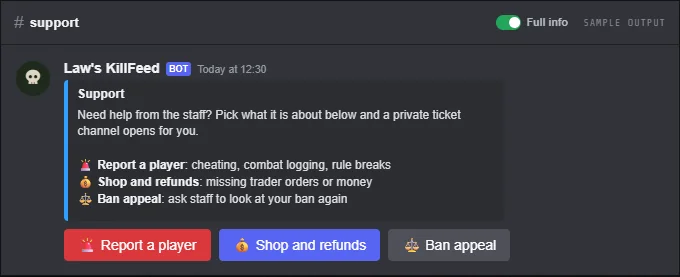
Players need somewhere to report a cheater, ask for a refund or appeal a ban. The ticket system posts a panel in a channel you pick. A player presses a button, answers a few questions, and the bot opens a private channel that only they and your staff can see.
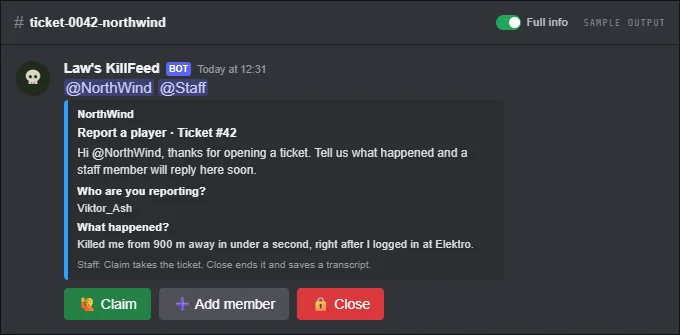
Staff claim the ticket, bring in other members if needed and close it when it is done. On close the bot saves a transcript and posts it to your log channel. Everything is set up on the Tickets page of the dashboard, with a live preview of the panel.
Tickets belong to the Discord, so every server on it shares the same panel and settings.
FreeFree plan
- 1 ticket type
- 20 new tickets per Discord per day
- Forms, claim, transcripts and the log channel
Paid plan: Up to 10 ticket types on one panel and no daily ticket limit.
What you get
Ticket panel
Your title, text and colour, with one button per ticket type: label, emoji, colour and a short description. Post it or update it from the dashboard.
Forms
Up to 5 questions per ticket type, short or long, required or optional. The answers show at the top of the ticket.
Private channels
Each ticket gets its own numbered channel that only the player, your staff roles and the bot can see. Each type can have its own staff roles and category.
Claim and add members
Staff press Claim to take a ticket, and Add member to bring in up to 5 more people.
Transcripts
Closing asks for an optional reason, saves the conversation as a text file and posts it with a summary to your log channel.
Limits
Choose how many tickets a player can have open at once (1 by default). New tickets have a 2-minute cooldown per player.
Ticket history
The dashboard lists the last 50 tickets: who opened, claimed and closed them, when, and why.
Screenshots
Set it up
- Add the bot to your Discord server.
- Log in to the dashboard with Discord and connect your Nitrado account.
- Pick your DayZ server and the channels to post in. The bot creates the channels for you.
- In the dashboard, open your server and pick Tickets.
- Choose the panel channel, staff roles and log channel, add your ticket types, then press Post panel to Discord.
Questions
Do I need a separate ticket bot?
No. Tickets run on the same bot as your kill feed. It needs to see the panel channel, send messages and embed links there, and be allowed to create channels for the tickets.
Who can see a ticket?
The player who opened it, the staff roles you picked for all tickets or for that type, anyone staff added, and the bot. Discord administrators can see every channel anyway.
What happens if someone deletes a ticket channel?
The bot closes that ticket with the reason "Channel deleted", so the history stays correct.
Do the buttons still work after the bot restarts?
Yes. Panel and ticket buttons keep working after restarts and updates.
Works well with
Whitelist & Bans
Whitelist, ban list and priority queue from Discord, with warnings and staff permissions.
Behaviour Alerts
Alerts for teleporting, boosting, rapid fire, impossible shots and ban evasion, with ban, watch and path buttons.
Server List
A free page for your server on our public DayZ server list, with players online, Join Discord and monthly votes.
Add it to your server
Free to add. No card needed.
