
Your DayZ admin log records far more than PvP kills: deaths to zombies, animals, falls and bleeding out, every join and leave, and everything players build or take apart. Law's KillFeed sorts all of it into its own Discord channels, so staff can follow the server without opening a log file.
Each feed has its own channel and its own location toggle, and every embed can be restyled in the dashboard.
FreeFree plan
- PvE, custom NPC, connection and build feeds
- Combat-log warnings
- Location toggle per feed
- Embed colours, titles and author text
Paid plan: Behaviour alerts for teleporting, boosting, rapid fire, impossible shots and ban evasion, and full embed editing.
What you get
PvE and death feed
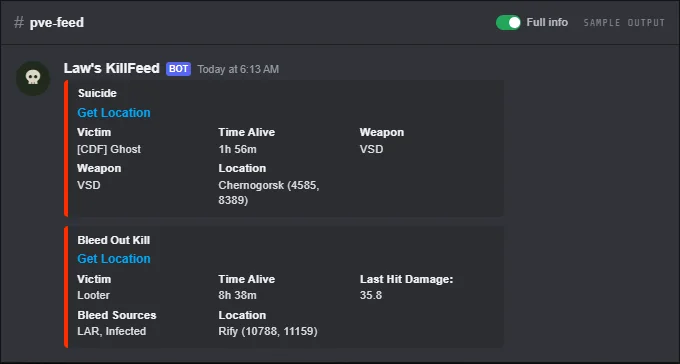
Deaths to zombies, animals, vehicles and explosions, plus falls, landmines, bleed-outs, drowning, starving, thirst and suicides, with the victim and their time alive.
Custom NPC kills
A separate channel for deaths involving custom AI on your server, with the killer, weapon and ammo.
Connections
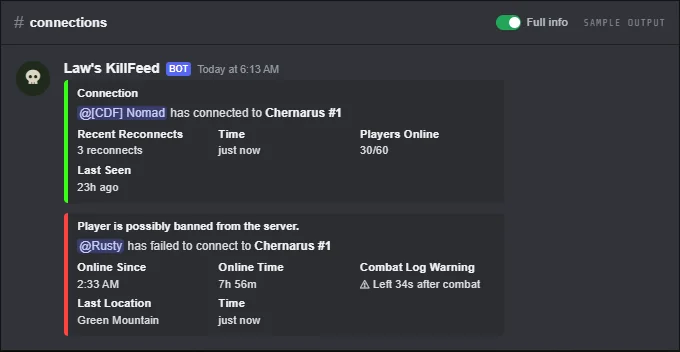
Every join and leave. Join posts flag players who keep reconnecting; leave posts show time online and the last tracked location.
Combat-log checks
Set a combat-logging time and anyone who leaves that soon after taking damage gets a warning and a flag on their leave post.
Failed joins
When a player fails to connect, the post says they may be banned.
Build log
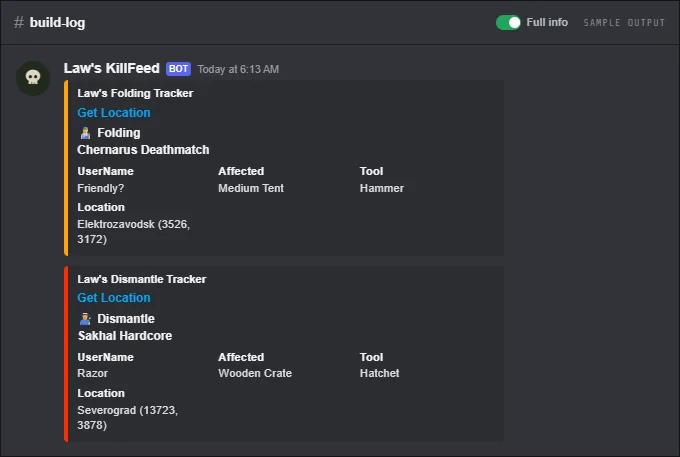
Placements, builds, dismantles, folds, tent packing and barbed wire, with the player, item, tool and a location link.
Behaviour alerts
Paid plan: staff alerts for teleporting, boosting, rapid fire, impossible shots, ban evasion and more, with ban and watch buttons. Alerts are hints for staff, not automatic bans. See Behaviour Alerts.
Screenshots
Commands
Click a command to see its options and an example.
-
/setupchannelLink kill feed functions to a channel. -
/locationTurn location info in each feed on or off. -
/plonShow players online on the server. -
/lastonlineShow when a player was last online. -
/warn listShow all warnings of a player, or everyone's warning count.
Set it up
- Add the bot to your Discord server.
- Log in to the dashboard with Discord and connect your Nitrado account.
- Pick your DayZ server and the channels to post in. The bot creates the channels for you.
Questions
Which deaths go to the PvE feed?
Every death not caused by another player: zombies, animals, vehicles nobody drove, explosions, falls, landmines, bleeding out, drowning, starving, thirst and suicide. Respawning or leaving while knocked out counts too when no player can be credited.
How does combat-log detection work?
Set a Combat Logging Time in the dashboard. If a player leaves within that many seconds of taking damage, the bot adds a warning and flags the leave post. Logging out while unconscious is flagged as well.
Why are some build actions missing?
The bot only sees what your server writes to the admin log, and the build log needs the Builders channel set. Anything your server doesn't log can't be posted.
Guides
Add a Killfeed to Your DayZ Xbox or PS5 Server
Connect your Nitrado console server to Discord and get kills, deaths and joins posted for free.
Add a Killfeed to Your DayZ PC Server
Connect your Nitrado PC server to Discord and get kills, deaths and joins posted, with nothing to install.
DayZ Admin Logs and Player List Logging on Nitrado
Find your server's .ADM admin log and turn on Player List Logging so positions, maps and online lists work.
Manage Your Nitrado Whitelist & Ban List from Discord
Add, remove and search whitelist, ban list and priority queue entries from Discord, with staff permissions.
Works well with
Kill Feed
PvP kills with weapon, distance, hit zone and damage, plus long-distance and streak feeds.
Behaviour Alerts
Alerts for teleporting, boosting, rapid fire, impossible shots and ban evasion, with ban, watch and path buttons.
Whitelist & Bans
Whitelist, ban list and priority queue from Discord, with warnings and staff permissions.
Maps & Tracking
Player positions, map images, PvP heatmaps and movement paths on Chernarus, Livonia, Sakhal and Nasdara.
Add it to your server
Free to add. No card needed.
