
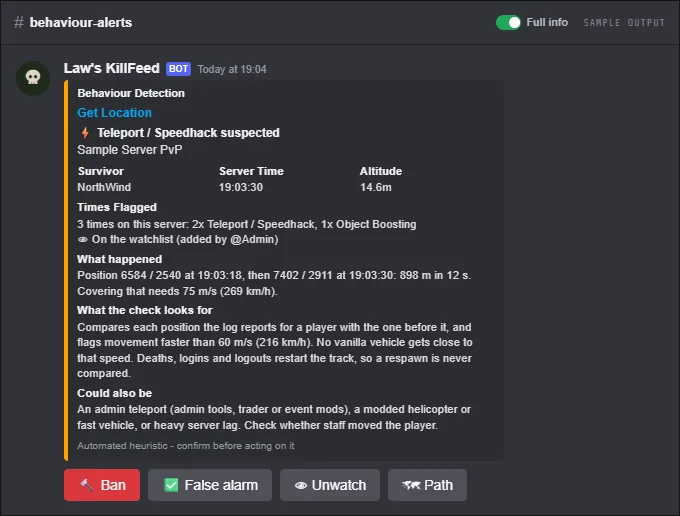
Behaviour alerts read the same admin log as the kill feed and look for things a fair player can't do: covering 150 m at over 200 km/h, climbing into the sky, firing faster than the gun allows, or landing a melee hit from across the road. When a check trips, your staff get an alert in Discord that says what happened, what the check looks for and what else it could be.
Alerts are hints for staff, not automatic bans: look at them, then use the buttons under the alert to ban, mark a false alarm or keep watching the player. Two things can act on their own, both switches on the Anti-Cheat page: a banned account that comes back under a new name gets the same ban, and players caught boosting over walls can be kicked for a few minutes.
Behaviour alerts are part of the paid plan and work on every map. The height checks (skywalking, flying, underground, shooting from under the map and shots through terrain) use the real ground height of Chernarus, Livonia, Sakhal and Nasdara.
FreeFree plan
- Ban evasion: a banned account back under a new name is banned again (Xbox and PlayStation)
Paid plan: Every behaviour check, the alert buttons, auto kick for boosting, the watchlist, ping role, whitelisted spots and the weekly summary.
What you get
Teleports and speed hacks
A player who covers 150 m or more at over 200 km/h. Deaths, logins and the server moving players out of restricted areas don't count.
Skywalking and underground
Players rising into the air after emotes or climbing straight up, players 6 m or more under the ground, and hits or kills from under the map.
Object boosting and stacking
Fireplaces or garden plots placed in one spot by a player standing higher each time, a known way over base walls, and piles of 5 placed within 3 m in 10 minutes by anyone.
Auto kick for boosting
Optional: players caught boosting or stacking get a short ban (10 minutes by default), which kicks them, and it lifts by itself. Staff can switch it from the Auto kick button on the alert too.
Impossible shots
Melee hits from more than 8 m, shotgun pellets and crossbow bolts past 120 m, pistol rounds and slugs past 250 m, and more shots in one second than the weapon can fire.
Headshot rate
Players who hit the head with 40% or more of their shots from 30 m and further, once they have 40 such shots, counted over about a month and compared with the rest of your server.
Combat logging
Logging out within 30 seconds of being shot by a player, or logging out while knocked out soon after a fight.
Ban evasion
A banned game account joins under a new gamertag: the bot bans the new name too, until the old ban ends, and tells your staff. On every plan, with or without behaviour alerts. Names another account also plays under are left alone, so a faked name never gets the real player banned.
A switch per check
Turn each check on or off. Three stricter ones start off: repeated headshots from 150 m, hitting 3 players within 3 seconds, and kills within 30 seconds of logging in.
Ban, false alarm, watch
Buttons under every alert for staff with ban rights: ban on Nitrado with a reason and a length, mark a false alarm so it stops counting, or put the player on a watchlist.
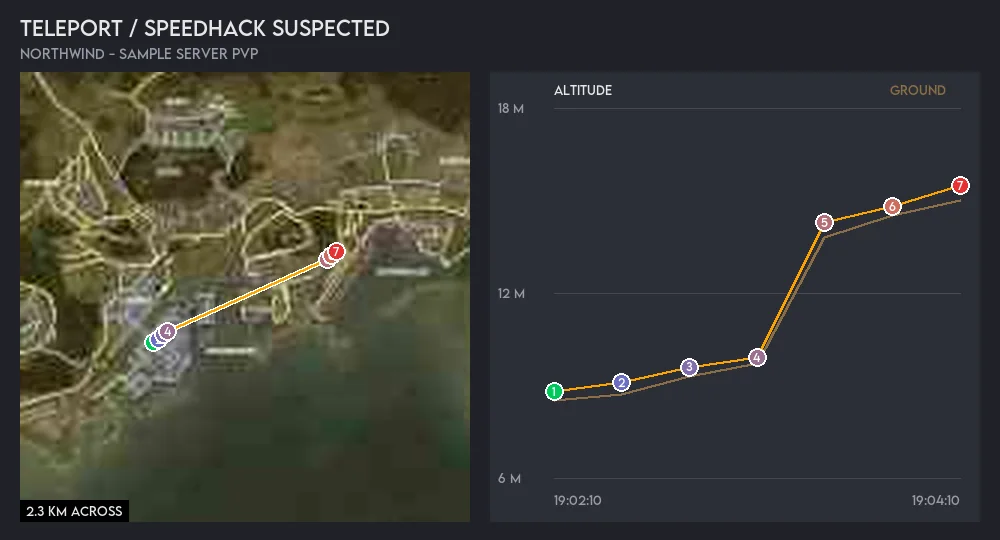
Path image
The Path button draws the player's last positions on the map with an altitude chart, so staff can see the jump for themselves.
Times flagged
Every alert says how often the player was flagged on your server before, for what, and how many false alarms they had.
Ping a role
Ping a staff role when a player reaches a number of alerts within a few days (5 in 7 days by default), and on every alert for a watched player.
Whitelisted spots
After a false alarm, whitelist 50, 150 or 500 m around the spot, so a tall building or a known map bug stops raising alerts there.
Weekly summary
Once a week, the players with the most alerts in the last 7 days, with a count per check. False alarms are left out.
Screenshots
Commands
Click a command to see its options and an example.
-
/banlist baddBan players. -
/banlist bcheckCheck if a player is banned, why, and by whom. -
/warn listShow all warnings of a player, or everyone's warning count.
Set it up
- Add the bot to your Discord server.
- Log in to the dashboard with Discord and connect your Nitrado account.
- Pick your DayZ server and the channels to post in. The bot creates the channels for you.
- On the server's Anti-Cheat page in the dashboard, switch behaviour alerts on and pick the checks you want.
- In Channel Setup, pick a Behaviour Alerts channel. Without one, alerts go to your admin channel.
Questions
Does the bot ban cheaters automatically?
No. Every behaviour alert is a hint for your staff, not proof. Staff check it and press Ban if they agree, and the footer of every alert says so. The only bans the bot makes on its own are the ones you switch on: ban evasion, and the few-minute auto kick for boosting.
Which maps does it work on?
Chernarus, Livonia, Sakhal and Nasdara. The height checks (skywalking, flying, underground, shooting from under the map and shots through terrain) use each map's real ground height.
Why doesn't ban evasion work on my PC server?
It isn't needed there. PC bans go by the player's id, so a new name doesn't get around them. Console ban lists hold gamertags, which is why the bot bans the new name for you.
What if a check keeps flagging a fair player?
Press False alarm: the alert stops counting towards the player's flags, pings and the weekly summary. If it is one spot on the map, whitelist the area from the same alert, or switch that check off.
Is this the same as the combat-log warnings?
No. The free combat-log check adds a warning to the player and flags their leave post. Behaviour alerts are a separate staff feed with its own checks.
Works well with
Server Logs
PvE deaths, connections with combat-log checks, and a build log with location links.
Whitelist & Bans
Whitelist, ban list and priority queue from Discord, with warnings and staff permissions.
Live Map
A web map of players, kills, fights and building you can share with players, plus a step-by-step player tracker for staff.
Add it to your server
Free to add. No card needed.