
A template restyles every feed the bot posts in one go: kills, PvE deaths, bounties, long-distance kills, kill streaks, the build log and connections. Pick one in the template gallery or on your server's Embeds page, look it over in the live preview, then save.
There are four kinds. A full look changes colours, texts and fields together and replaces your current setup. Colour, language and field templates change only their part, so they stack: Neon colours with German texts and the Compact fields, for example.
Made a look you like? Share it from the Embeds page and you get a link. Anyone with the link can preview it and use it on their own server, and you can list it in the community templates so others find it.
FreeFree plan
- Full looks: their colours, titles and author text
- Every colour palette
- Languages: titles, author lines and the texts the bot writes itself
- Sharing templates and the community templates
Paid plan: Everything in a template: descriptions, footers and field labels too, and the field layout templates.
What you get
Full looks
Six complete styles: Original, Minimal, Emoji, Tactical, Neon and Grim. Original puts the bot's default look back.
Colour palettes
Nine sets of colour bars, from Discord and Military to Blood, Ocean and Monochrome. Your texts and fields stay as they are.
10 languages
Author lines, descriptions and field labels in English, German, French, Spanish, Brazilian Portuguese, Polish, Russian, Italian, Dutch or Czech. The texts the bot writes itself switch too.
Field layouts
Five presets for which fields show and in what order: All fields, Essentials, Compact, Admin details and Public feed.
Share with a link
Share your own look as a template, up to 20 per account. The link opens a preview page with a Use it button that applies it to a server.
Community templates
Browse and search the looks other server owners listed, most used first.
Screenshots
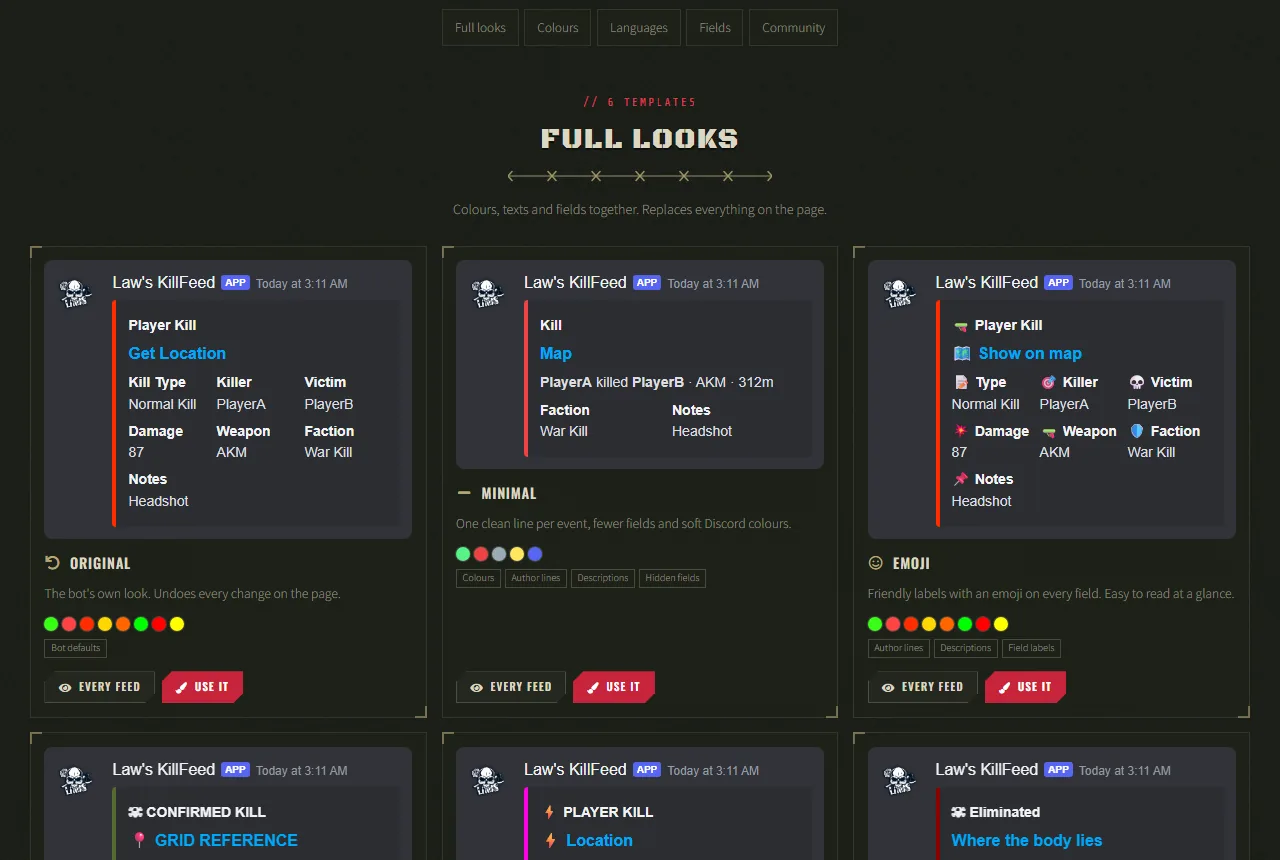
Set it up
- Add the bot to your Discord server.
- Log in to the dashboard with Discord and connect your Nitrado account.
- Pick your DayZ server and the channels to post in. The bot creates the channels for you.
- Open the template gallery and pick Use it on a template, or open your server's Embeds page in the dashboard and pick Templates.
- Look it over in the preview, then pick Save all. The next post uses the new look.
Questions
Do templates cost anything?
No. Templates are free to use and to share. On the free plan a template changes colours, titles and author text; the paid plan applies descriptions, footers and field labels too, and the field layout templates.
Can I combine templates?
Yes. Colour, language and field templates each change only their part, so they stack. A full look replaces everything, so apply it first.
Does applying a template change Discord straight away?
No. It only changes the Embeds page. Nothing changes in Discord until you pick Save all, and Discard puts the page back.
How do I go back to the default look?
Apply Original, the full look with the bot's default colours, texts and fields. The English template puts the bot's own texts back in English.
Works well with
Embed Editor
Change the look of every feed post in a live preview: colours, titles, author text, descriptions, footers and fields.
Embed Builder
Build Discord messages with embeds and link buttons in a live preview, post them as the bot, then edit or delete them later.
Kill Feed
PvP kills with weapon, distance, hit zone and damage, plus long-distance and streak feeds.
Add it to your server
Free to add. No card needed.
