
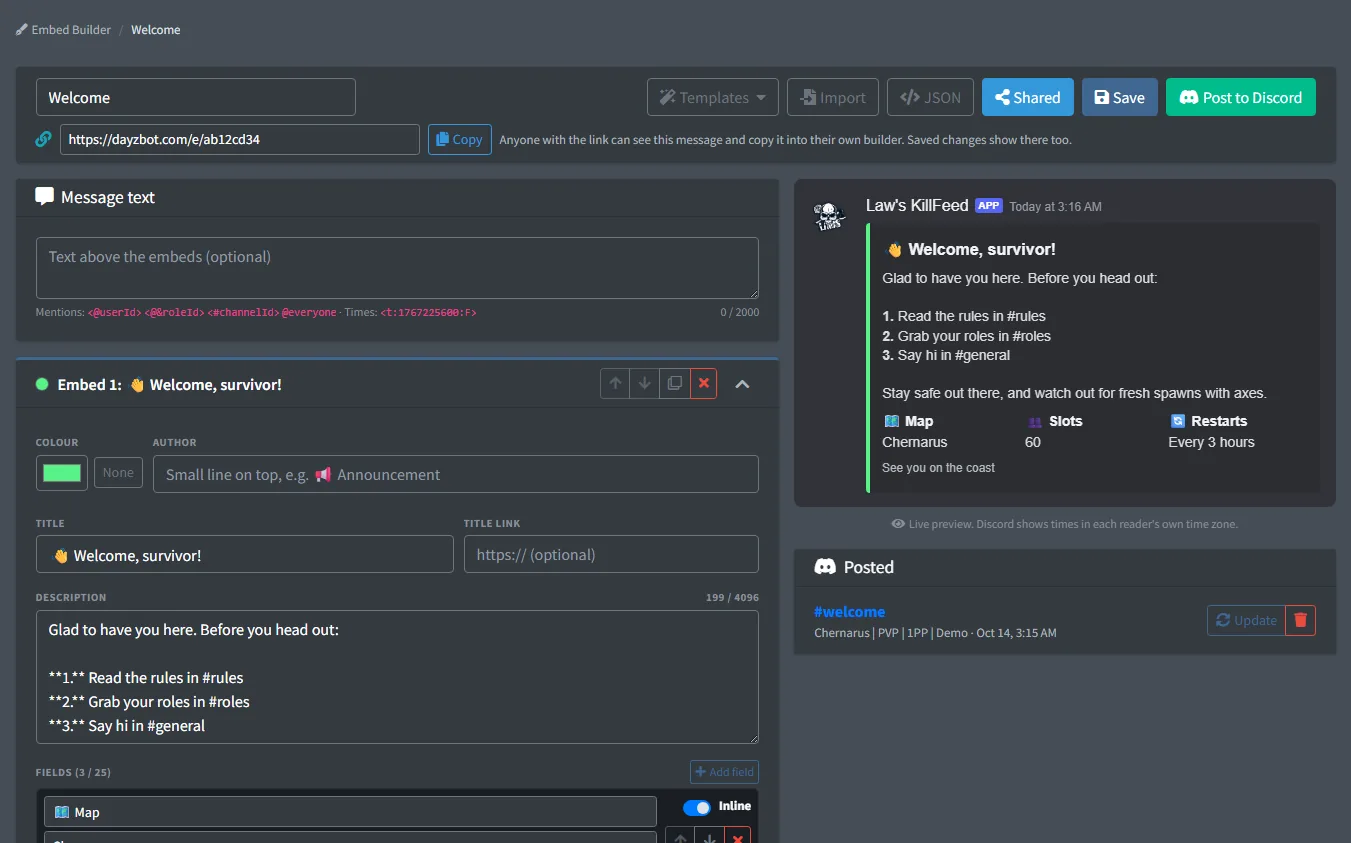
Write rules, welcome messages, wipe notices and event posts as Discord embeds, see them in a live preview, and post them to any channel of your Discord as the bot. No webhooks and no second bot.
The bot remembers what it posted. Change the saved message and pick Update to edit the post in Discord, or delete it from the same page.
Start blank or from one of nine starters, or import a message from Discohook. Share a message with a link, and other server owners can copy it into their own builder.
FreeFree plan
- The whole builder: 10 embeds, fields, images and link buttons
- Posting as the bot, then updating or deleting the post
- Up to 50 saved messages, each with its own share link
What you get
Live preview
See the message as Discord shows it while you type: markdown, fields side by side, and timestamps in each reader's own time zone.
Up to 10 embeds
Each with author, title, link, description, up to 25 fields, image, thumbnail, footer and timestamp. Add message text above them and up to 5 link buttons below.
Post as the bot
Pick a server and a channel, and the bot posts it. Update or delete the post later from the builder.
Starters
Announcement, Welcome, Server rules, How to join, Wipe notice, Restart times, Event, Shop and Staff applications, ready to fill in.
Discohook import and export
Paste a Discord message, an embed or a Discohook backup to load it. Copy any message out as Discord JSON for webhooks.
Safe pings
@everyone, @here and role mentions only ping when the owner or a manager allows it. Staff with the Embeds permission can post, but not ping everyone.
Screenshots
Set it up
- Add the bot to your Discord server.
- Log in to the dashboard with Discord and connect your Nitrado account.
- Pick your DayZ server and the channels to post in. The bot creates the channels for you.
- In the dashboard, pick Embed Builder in the sidebar and start a message, blank or from a starter.
- Save it, pick Post to Discord, then choose the server and the channel.
Questions
Does it cost anything?
No. The Embed Builder is free on every plan.
Who can post as the bot?
The server owner, managers, and staff whose dashboard permission group includes the Embeds page.
Can I change a message after posting it?
Yes. Edit the saved message, save, and pick Update next to the post. Deleting the saved message leaves its posts in Discord, so delete those from the Posted list first.
Why does Discord refuse the post?
The bot needs View Channel, Send Messages and Embed Links in that channel.
Can I use messages from Discohook?
Yes. Import takes a Discord message, a single embed or a Discohook backup. Export gives Discord JSON that works in Discohook and in webhooks.
Works well with
Embed Templates
Ready-made looks, colour palettes, languages and field layouts for every feed, plus templates other server owners shared with a link.
Embed Editor
Change the look of every feed post in a live preview: colours, titles, author text, descriptions, footers and fields.
Support Tickets
A ticket panel with buttons and forms; each ticket gets a private channel, with claim, close and saved transcripts.
Add it to your server
Free to add. No card needed.
